134: Wait Magic Explained: How to Use Thrill Data Wait Magic for Disney World Lightning Lane Multi Pass
Listen On: Spotify | Amazon Music | Apple Podcast
If you have heard Disney people talking about Wait Magic and thought, Okay, but what exactly is Wait Magic?, you are in the right place. And if you already opened Wait Magic, saw all of the different options and immediately thought, What in the world am I supposed to do with all of this?, you are also in the right place.
I have spent a LOT of time learning Walt Disney World's Lightning Lane system. I use Lightning Lane on our family trips, I've used it with small groups and large groups, I track attraction availability and sellout order, and I am absolutely the person who will sit there modifying a Lightning Lane over and over again trying to get a better time. I actually think understanding how to modify and work with Lightning Lane is one of the biggest differences between simply buying Lightning Lane and actually maximizing what you paid for.
The problem is that I don't necessarily want to spend my Disney vacation doing that.
I don't want to walk around World Showcase staring at my phone because I'm trying to move Remy's Ratatouille Adventure up two hours. I don't want to stop what we're doing every few minutes to check whether Frozen Ever After popped back up. And when I'm traveling with four kids, I'm already managing where everyone needs to be, who's hungry, who needs to go to the bathroom, who doesn't want to ride something anymore and approximately 75 other things at the same time.
That's where Wait Magic comes in.
Wait Magic is a third-party tool from Thrill Data that helps automate some of the searching, modifying and booking you may already be doing with Walt Disney World's Lightning Lane system. After testing it, I think Wait Magic can be a complete game changer, but I don't necessarily think it is for everyone. This is a tool that makes the most sense when you already understand Lightning Lane, have a general strategy for your Disney day and know what you're asking Wait Magic to accomplish.
So this is going to be a COMPLETE Wait Magic guide. We're going to talk about what Wait Magic is, how it works, how to connect Wait Magic to My Disney Experience, how to set up your family, how to create a Wait Magic search, what all of those return-time options mean, how to use Wait Magic before your trip and how to use it once you're actually inside Walt Disney World.
Then we're taking it one step further and going park by park through Magic Kingdom, EPCOT, Hollywood Studios and Animal Kingdom. Because learning how to push the buttons is only half of this. The bigger question is: what should you actually tell Wait Magic to do?
That is where strategy comes in.
What Is Wait Magic?
Wait Magic is a third-party Lightning Lane tool created by Thrill Data. If you're already familiar with Thrill Data, you may know the website for its Walt Disney World wait-time information, crowd data, Lightning Lane availability, historical park information and other statistics. Thrill Data is actually one of the crowd-calendar resources I use because I like being able to look beyond a simple crowd number and see what has actually been happening with attraction waits and availability.
Wait Magic takes that idea a step further. Instead of simply giving you information about Lightning Lane availability, it can help search for and manage eligible Lightning Lane selections based on the parameters you give it.
Let's say I have a Lightning Lane for an attraction at 6:00 p.m., but my family doesn't really want to stay in that park until 6:00. Normally, I could open My Disney Experience, find the reservation, hit modify, look at the available return times and see whether anything better is there. If there isn't, I refresh. I may check again 20 minutes later, and then again after lunch. Eventually someone may modify their plans, cancel something or Disney may release additional availability and suddenly a better time appears.
If I'm looking at exactly the right moment, I might grab it.
Wait Magic can essentially keep looking for me. I tell it which attraction I'm interested in and what kind of return time I'm willing to accept, and Wait Magic continues searching based on those instructions.
That's the basic concept behind the entire service. Instead of you constantly looking, you're giving Wait Magic a job and letting it handle some of the repetitive work.
Wait Magic Is Not a Disney Product
Before we get any further, I want to make this very clear because I know connecting something to your Disney plans can immediately make people nervous. Wait Magic is not a Disney product. It isn't part of Walt Disney World, it isn't built into My Disney Experience and it isn't included when you purchase Lightning Lane Multi Pass. Wait Magic is a completely separate third-party service created by Thrill Data.
That means you need to decide whether you're personally comfortable using a third-party service with your Disney plans. It also means Wait Magic does not have access to some secret stash of Lightning Lanes that Disney is hiding from everybody else.
If Slinky Dog Dash is completely unavailable, Wait Magic cannot manufacture a Slinky Dog Dash Lightning Lane. If you want Remy's Ratatouille Adventure between 1:00 and 2:00 p.m. and that time never becomes available, Wait Magic cannot magically create it.
Disney still controls the inventory.
What Wait Magic can do is continue watching for qualifying availability so that you don't have to be the person staring at your phone waiting for something to appear. That's an important distinction because I don't want anyone buying Wait Magic thinking they just purchased guaranteed access to every popular attraction at Walt Disney World.
You're purchasing automation and convenience, and for me, THAT is what makes the service valuable.
Wait Magic Is Not Your Lightning Lane Strategy
This may be the most important thing I tell you in this entire guide: Wait Magic is not your Lightning Lane strategy. It is a tool that can help you execute the strategy you've already created.
You still need to understand which attractions are priorities for your family, which Lightning Lanes tend to disappear first, where those attractions are located, whether you're planning to rope drop, whether you're taking a midday break, how long your family can realistically stay in the park, what dining reservations you have and which people in your travel party actually want to ride together.
Simply purchasing Lightning Lane doesn't automatically give you a great Disney day, and purchasing Wait Magic doesn't either. You still need a general plan.
This is actually consistent with how I have always taught Lightning Lane. Before I worry about the perfect booking order, I want you to figure out what your family cares about. Your five most important attractions may look completely different from mine. A family traveling with toddlers isn't going to have the same priorities as a family with teenagers, and neither of those families should be following the exact same Lightning Lane plan.
Wait Magic comes in after you've done that thinking. You create the strategy, and then you hand some of the repetitive work over to Wait Magic.
Who Should Use Wait Magic?
I think Wait Magic is best for someone who already has at least a basic understanding of Walt Disney World's Lightning Lane system. You do not have to be a Disney expert, but if phrases like Lightning Lane Multi Pass, Lightning Lane Single Pass, attraction groups, return windows, modifying and sellout order mean absolutely nothing to you, I would learn Lightning Lane first.
I have an entire Lightning Lane series on Well Hello Magic and a long YouTube video where I break the system down to the rudimentary level. Even though that video was originally created in 2025, the core structure and strategy foundations still apply, and I continue to update the information as Disney makes changes.
The reason I want you to understand Lightning Lane first is because Wait Magic gives you a LOT of choices. That's wonderful when you know what you want. It's overwhelming when you don't.
If Wait Magic asks whether you want the earliest available time, morning, early morning, late morning, afternoon, early afternoon, late afternoon, evening, before a certain time, after a certain time or a custom range, those choices are only useful if you understand why you would pick one over another.
That's why I consider Wait Magic more of an advanced Lightning Lane tool. Once you understand what you're doing, all of those options become one of its strengths.
Before You Set Up Wait Magic, Decide What Kind of Disney Day You're Having
Before I start choosing attractions, I like to decide what kind of Disney day we're actually trying to have. I have talked about this for years because not every Disney day needs to look the same.
Sometimes we're having a ride-focused day, where our goal is to maximize attractions and we're willing to use rope drop, Lightning Lane and late-night strategy to make that happen. Other times we're having a leisure day, where I may want a few rides but I also want to eat, shop, take pictures and enjoy the park. We may have a show-focused day where entertainment and characters matter more, or a bucket-list day where there are a handful of experiences we absolutely want to accomplish and everything else is a bonus.
This matters with Wait Magic because I don't need the tool working the same way on every one of those days. If we're having a leisurely EPCOT festival day, I don't need Wait Magic aggressively moving my schedule around every 20 minutes. If I'm having a ride-focused Magic Kingdom day and my kids want to ride everything possible, that's a completely different situation.
I also like families to identify approximately five major ride priorities before they start booking. Separately, I think a realistic Disney day is around eight major experiences when you account for attractions, table-service meals, shows, parades, characters and nighttime entertainment. You may absolutely accomplish more than eight things, but I don't want you arriving with a list of 17 experiences that are ALL supposedly non-negotiable.
Wait Magic should make your vacation easier. Don't use it to create a schedule that has everyone running around miserable.
Understand the Lightning Lane Rules Before You Start
Wait Magic works on top of Disney's existing Lightning Lane system, so you still need to make your initial plans through Disney. As of this guide, Lightning Lane Multi Pass allows you to choose up to three experiences and arrival windows in advance. At Magic Kingdom, EPCOT and Hollywood Studios, the initial selections use attraction groupings. Animal Kingdom currently does not use those same groupings.
Once you redeem a Multi Pass selection on the day of your visit, Disney allows you to choose another eligible Multi Pass experience, subject to availability. Disney also says that once a selection has been redeemed, or once its arrival window has passed, you can continue making additional selections one at a time through regular park closing as availability allows.
That same-day behavior is a huge part of why Wait Magic can become so useful. Your original three Lightning Lanes are not necessarily the end of your Lightning Lane day. They are the beginning.
Now let's actually set this thing up.
Step 1: Create Your Thrill Data Account
For the initial Wait Magic setup, I strongly recommend sitting down at a desktop or laptop computer. You're eventually going to use Wait Magic from your phone while you're in Walt Disney World, but I think trying to complete the entire initial setup from a small phone screen makes the process feel more complicated than it needs to be.
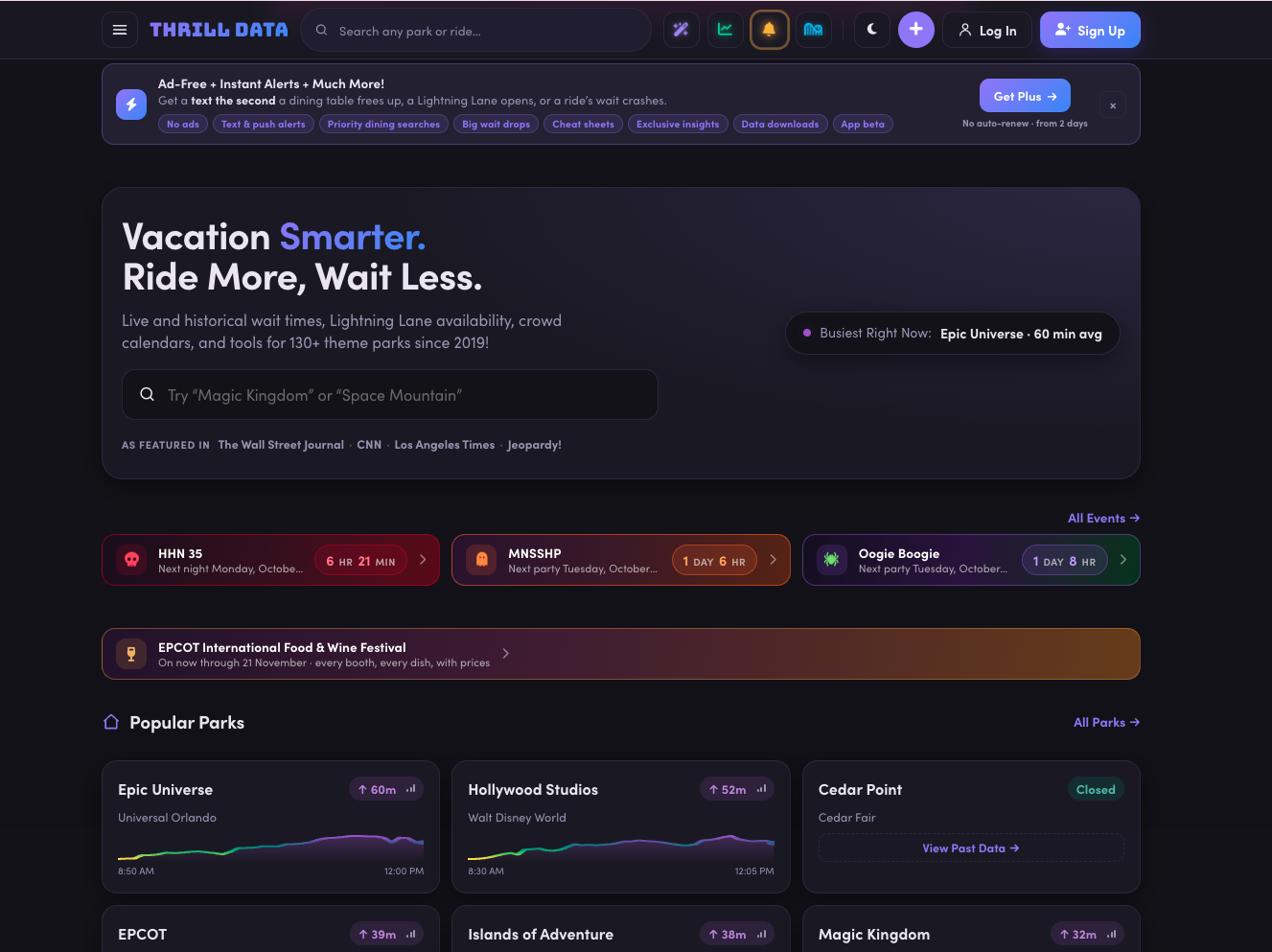
Go to Thrill Data and create your account. Once you're logged in, you'll have access to the different Thrill Data tools and the Thrill Data Plus membership that includes Wait Magic.
You may notice that Thrill Data contains a lot more information than you need if you're simply planning one Disney vacation. I love digging into the data because it helps me with content creation and trip planning, but you don't need to understand every chart on the website to use Wait Magic.
Our goal right now is simply to get your account created and get you into Wait Magic.
Step 2: Choose the Thrill Data Plus Membership That Makes Sense for Your Trip
Wait Magic is included with Thrill Data Plus. When I recorded the podcast, Thrill Data offered several membership lengths ranging from short trip-length access to monthly, yearly and lifetime options. Because pricing and plan structure can change, I want you to look at the current options when you're actually purchasing instead of relying on an old screenshot or blog post.
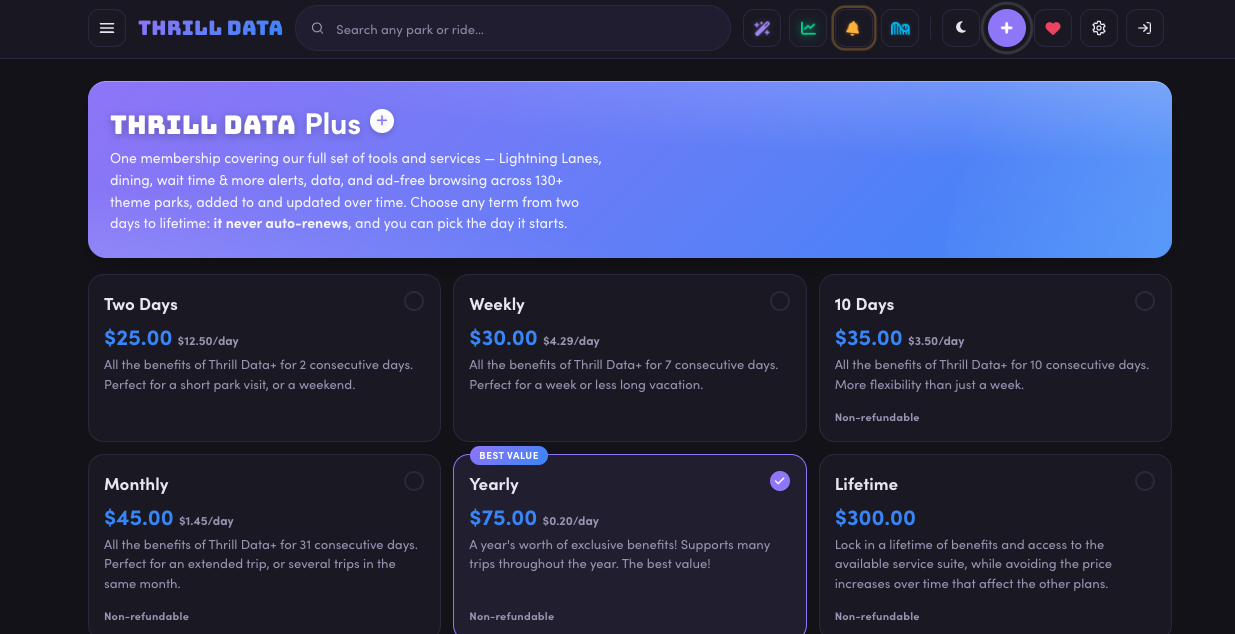
For most families, my recommendation is very simple: buy enough access to cover the period when you're actually going to use it.
If you're taking one seven-day Disney vacation, you probably don't need a year. If you're someone like me who visits multiple times a year and uses Thrill Data for other planning and research, a longer membership may make more sense.
I also wouldn't activate a short-duration membership months before your vacation just because you're excited to play with it. Do your research early, understand the system and decide what your family wants to accomplish. Then make sure your actual paid access covers the period when you'll be setting up and using your searches.
Step 3: Connect Wait Magic to My Disney Experience
This is probably the part that sounds the most intimidating when I explain it out loud, so I want to slow down here.
You are not simply handing Thrill Data your Disney username and password. Wait Magic connects through Disney's Friends & Family functionality. If you've ever traveled to Walt Disney World with extended family or friends and allowed someone else to see or manage plans for your group, you've probably already used this system without thinking much about it.
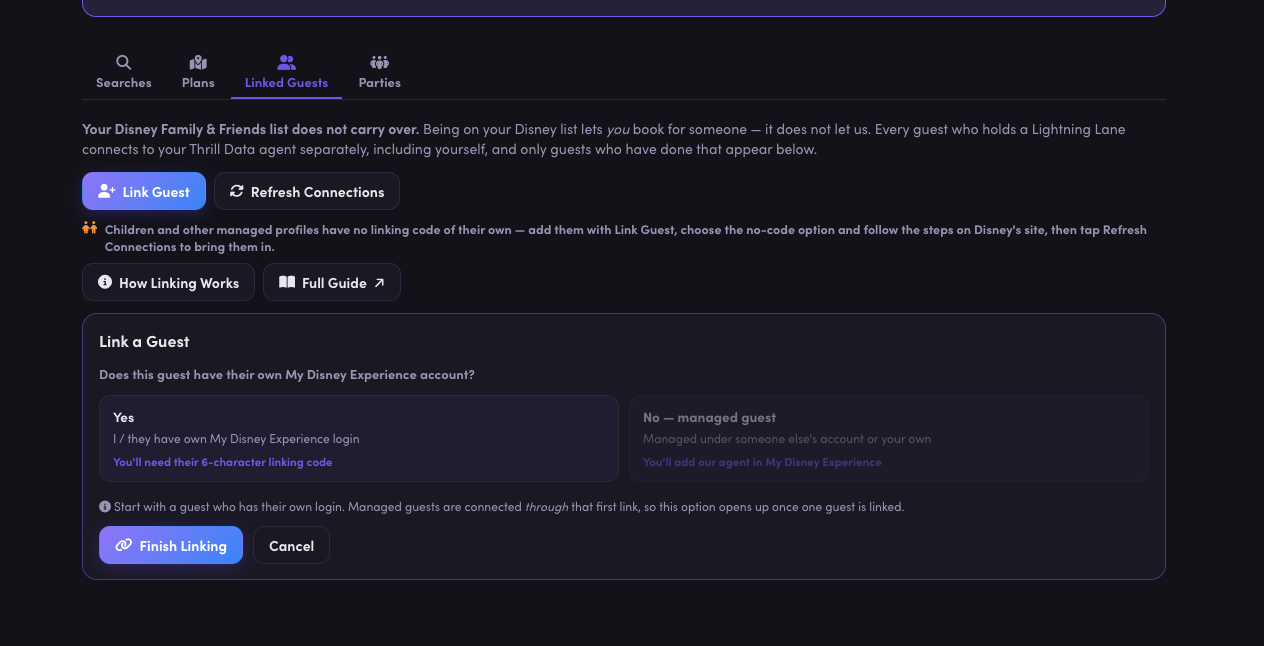
Thrill Data refers to its linking area as the MDX Connector, with MDX referring to My Disney Experience. Once you're inside Thrill Data, follow the current linking instructions because the exact interface and assigned Wait Magic profile can change over time.
When I set mine up, Thrill Data provided the Wait Magic profile I needed to connect through Disney's Friends & Family system. Once that connection was established, Wait Magic could see the eligible Disney profiles connected to it.
The easiest way I can explain this is: Wait Magic is connected to your plans. You are not logging into Disney through Wait Magic.
Step 4: Make Sure Everyone in Your Travel Party Is Actually Connected
This is especially important for families with children.
I travel with my husband and four kids. It isn't enough for Wait Magic to see only me if I'm expecting it to manage eligible Lightning Lane plans for all six of us. Some of our kids have profiles that are managed by an adult, and those profiles can behave differently from independent adult Disney accounts.
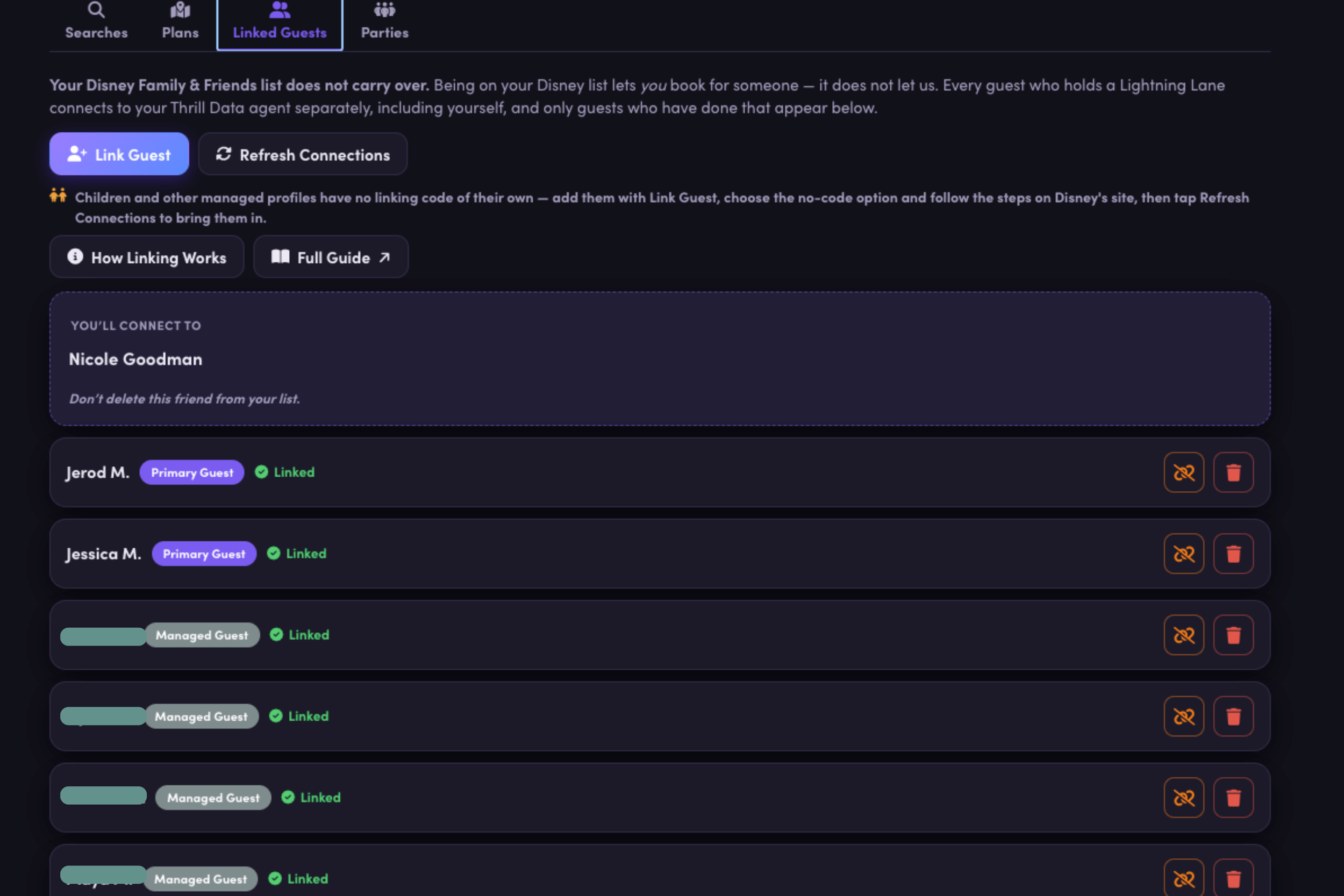
Take your time with this step. Once you've completed the linking process, go back into Thrill Data and look at your linked guests. If you're traveling with six people and you expect Wait Magic to work for all six, you should be able to confirm that the appropriate six people are connected.
Do not wait until you're standing in the park to discover that one of your children isn't linked correctly.
This is exactly why I like doing all of this ahead of time.
Step 5: Create Your Wait Magic Parties Before the Trip
This is one of my biggest Wait Magic setup tips, especially for families with mixed ages or different ride preferences.
Wait Magic allows you to create parties, which are essentially preset groups of people who commonly ride together. If you have a family of four and everyone rides everything together, congratulations. Your setup may be incredibly simple. You can create one party with your family name and move on.
My family does not work that way.
We have six people with different ride preferences, so I created multiple groups ahead of time. I have our entire Mickelson family, a coaster group for the people who enjoy bigger rides, groups for the girls and boys, and a non-coaster combination for the people who aren't interested in certain thrill rides.
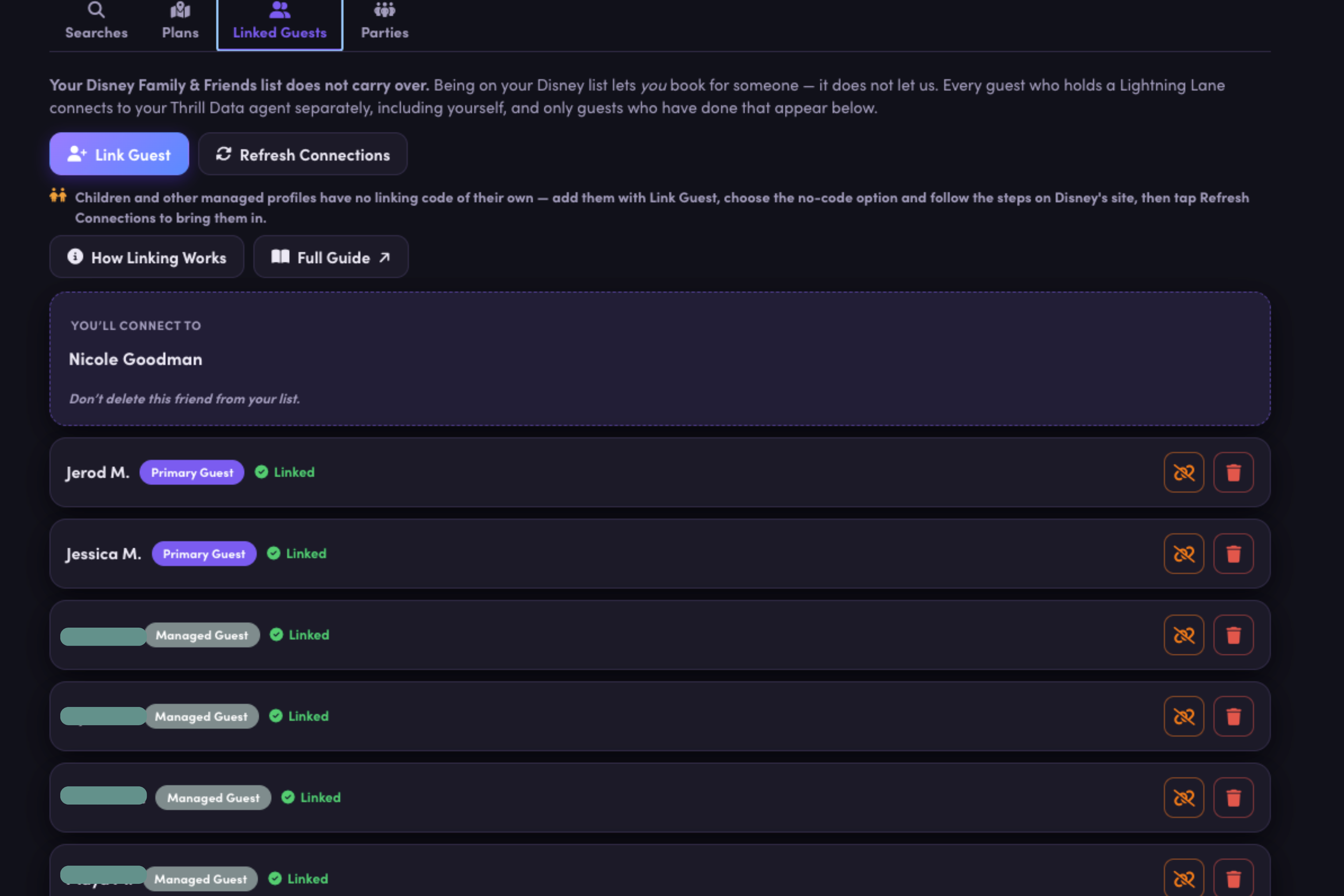
This becomes even more useful when I think about our multigenerational trips. I can create a grandparents-and-littles group, an adult-kids group or any other combination that we commonly use. If the grandparents take the younger kids to one attraction while the adults and older kids ride something else, I don't want to stand in the middle of Magic Kingdom trying to manually rebuild those parties.
I'm doing that at home.
Think about your family and ask yourself which combinations of people are realistically going to split up during the trip. Create those groups now, even if you don't use every single one.
Step 6: Make Your Initial Lightning Lane Selections Through Disney
Wait Magic does not replace Disney's advance Lightning Lane booking process. You still need to purchase Lightning Lane and make your initial selections through Disney.
This is where the strategy work you've already done matters. You should know which attractions are most important to your family, which attractions are more difficult to get and which rides you may be willing to experience through rope drop or standby instead.
Disney currently allows Multi Pass guests to make up to three advance selections in one park. Magic Kingdom, EPCOT and Hollywood Studios use attraction groupings for those initial selections, while Animal Kingdom currently allows you to choose from its Multi Pass list without that same tiered structure. The exact attractions can change, so always check Disney's current list when you book.
Once you have those initial three selections, look at what you actually got. Maybe the schedule is beautiful and you don't want to touch anything. Fantastic.
More likely, at least one return time isn't exactly what you wanted.
Now Wait Magic gets interesting.
Step 7: Create Your First Wait Magic Search
Let's use EPCOT as our running example because that's the example I used throughout the podcast.
Open Wait Magic and select New Search. You'll choose the date of your park visit, select the party you're making the request for, choose EPCOT and then choose the attraction you want Wait Magic to work with.
Let's say I already have Mission: SPACE booked for my entire family at 10:00 a.m., but I would really like to ride it earlier. Wait Magic will ask whether I already have a Lightning Lane for that attraction. In this case, I do, so I'm going to tell Wait Magic that I want to modify the existing reservation rather than simply search for a brand-new one.
This is where the number of options starts to make sense. Wait Magic isn't just asking, “Do you want Mission: SPACE?” It wants to know what would actually make the reservation better.
SCREEN SHOTS COMING SOON!!!!!
Step 8: Tell Wait Magic What Return Time You Actually Want
When you create a search, Wait Magic gives you multiple ways to define what you're willing to accept. During my testing, I could choose broad windows such as morning, afternoon or evening, narrower windows within those periods, the earliest available time, only before a certain time, only after a certain time or a custom range.
This is where understanding your Disney strategy matters.
If I already have Mission: SPACE at 10:00 a.m. and my entire goal is simply to get something earlier, I don't necessarily need to tell Wait Magic that I want “morning.” I can tell it I only want something earlier than my existing time.
On the other hand, maybe I have a Lightning Lane at 6:00 p.m. and I know we'll be leaving the park after dinner. In that case, I may give Wait Magic a much broader afternoon window.
The more specific you are, the more specific Wait Magic's job becomes. That's good when you genuinely need a narrow window, but being too restrictive can also make a search much harder to fulfill.
If you tell Wait Magic you will ONLY accept Remy's between 1:00 and 2:00 p.m., it can only succeed if qualifying availability appears during that exact period. If 12:00 to 3:00 would actually work just as well for your family, give it the larger window.
My general preference is to give Wait Magic enough flexibility to find something without giving it so much flexibility that it destroys the flow of our day.
Step 9: Decide What Wait Magic Should Do After It Finds Something
Pay attention to the setting that controls what happens after Wait Magic successfully changes a reservation. Depending on your search, you may want it to pause once it finds something that meets your criteria, or you may want it to continue looking for an even better option.
This sounds like a small setting, but it matters.
During testing, there were times when I allowed a search to keep modifying because I wanted an attraction earlier and earlier. Wait Magic continued doing exactly what I asked it to do, but eventually the attraction moved so early that it started interfering with the rest of my plan.
Wait Magic wasn't wrong. My instructions were.
If you know you'll be happy once the attraction falls into a particular window, pause after success. If you're genuinely willing to keep improving it, let the search continue.
Just remember that automation will follow your instructions. It doesn't know that your six-year-old suddenly needs lunch or that you changed your mind about walking across EPCOT.
You still have to be the planner.
Step 10: Create Your Searches Around the Day You Actually Want
This is where I think people can either make Wait Magic amazing or make it incredibly annoying.
Do not create a giant list of attractions and tell Wait Magic “anytime” for everything.
Technically, that gives Wait Magic a lot of freedom. Practically, it can create a terrible Disney day.
Imagine standing in Norway after riding Frozen Ever After and getting a Soarin' return time that sends you back toward World Nature, followed by something on the opposite side of the park, followed by Remy's all the way in France.
Congratulations. You got Lightning Lanes.
Your feet hate you.
I want you to think about your Disney day in sections. Where are you likely to be in the morning? Where do you expect to eat lunch? Which part of the park are you moving toward in the afternoon? Are you planning a midday resort break? Are you staying for nighttime entertainment?
Then create your Wait Magic windows around that flow.
This is especially important at EPCOT because the park is enormous, but geography matters at every Walt Disney World park.
My EPCOT Wait Magic Strategy
EPCOT is the perfect park for explaining how I think Wait Magic should work because geography matters so much here. EPCOT also has two entrances, which can completely change your morning strategy. Guests entering through the main entrance arrive near Spaceship Earth, while International Gateway guests enter between the United Kingdom and France, giving them a very different starting point for attractions like Remy's Ratatouille Adventure.
Disney currently places Frozen Ever After, Remy's Ratatouille Adventure and Test Track in EPCOT's first Multi Pass group. Guardians of the Galaxy: Cosmic Rewind is currently a separate Single Pass attraction. The remaining Multi Pass attractions include options such as Mission: SPACE, Soarin', Spaceship Earth, Living with the Land and several lower-demand experiences.
Let's say I'm entering EPCOT through the front of the park. I know we want Test Track, Frozen, Guardians, Mission: SPACE, Soarin' and Remy's during the day. Instead of trying to use Lightning Lane for everything at random times, I'm going to think about where we will physically be.
Maybe I use early entry or rope drop for one of my major priorities. I have Guardians planned for the morning, and I have Mission: SPACE early because we're already spending the first portion of the day in that area. Remy's may be booked later because we're eventually moving into World Showcase.
Now I can use Wait Magic to improve the gaps.
If Mission: SPACE is sitting at 10:00 and I want it closer to park opening, I create that modification search. I may create a Frozen search for the morning because that's another major family priority. I may also search Test Track because my kids love it and would happily ride again if the opportunity appears.
Then I may create a Soarin' search for early afternoon because my rough plan has us moving toward World Nature around lunchtime. If we're eating at Sunshine Seasons, getting Soarin' around that same period makes sense.
That's the difference between using Wait Magic and just throwing attractions into an app.
I'm telling Wait Magic where I want the day to go.
Don't Forget Living with the Land During the Holidays
Living with the Land is normally an attraction I wouldn't necessarily make one of my highest Wait Magic priorities because availability tends to be easier than EPCOT's major headliners. During the holiday season, however, the Glimmering Greenhouses make the attraction much more popular.
And if you're riding specifically for the holiday lights, I prefer riding it after dark.
That's the kind of little seasonal adjustment you can make with Wait Magic. Your search strategy in July does not have to look exactly like your strategy in December.
What Happens Once You Start Tapping Into Lightning Lanes?
This is where Wait Magic started feeling really valuable to me.
Disney currently allows you to make another Multi Pass selection once you redeem a selection, subject to availability. You can continue making additional selections one at a time as your day progresses.
Normally, this means I tap into an attraction, immediately start thinking about what I should book next and pull out My Disney Experience.
With Wait Magic, I have already done some of that thinking.
I've already told it which attractions I'm interested in and what windows work with my day.
So I can tap into a Lightning Lane, ride the attraction, come back out and potentially discover that Wait Magic has already acted on one of the opportunities I told it to look for.
Maybe Frozen is now sitting in my plans.
I didn't have to stand outside Mission: SPACE refreshing My Disney Experience. I didn't have to stop the family and tell everyone to wait while I searched.
I did the thinking before the trip.
Wait Magic did some of the clicking.
That is the part I love.
Don't Set Wait Magic and Completely Forget About It
Even though the entire point is to spend less time managing Lightning Lane, I don't recommend setting your searches in the morning and never looking at them again.
Disney days change.
Maybe the attraction you were searching for suddenly has a 10-minute standby wait and you ride it that way. Great. You probably don't need that search anymore.
Maybe one of your kids changes their mind.
Maybe everyone is exhausted.
Maybe you decide to leave EPCOT earlier than expected.
Maybe you're park hopping.
Maybe Wait Magic found something that changes the rest of your plan.
Every once in a while, open your active searches and make sure they still reflect the day you're actually having. Pause or delete the things you don't need anymore, adjust windows that no longer make sense and add a new priority if your plans have changed.
You don't need to obsessively manage it. That defeats the entire purpose.
Think of it as checking in with your assistant, not doing the assistant's job yourself.
How Many Wait Magic Searches Should You Have?
I personally don't want 15 active searches running for every attraction in the park. Could you create a lot of searches? Sure. But that isn't how I want to use the service.
I would rather have around five meaningful searches tied to things we actually care about. Remember, you already have your advance selections. Wait Magic is helping improve those plans and fill the next opportunities.
Once we've accomplished our major priorities, I can loosen the parameters and start having more fun with whatever availability exists.
But early in the day, I want the searches focused on things that actually improve our plan.
Using Wait Magic at Magic Kingdom
Magic Kingdom is probably where Wait Magic has the greatest potential for sheer volume because there are so many Multi Pass experiences. Disney currently separates the initial Multi Pass selections into two groups, with attractions such as Big Thunder Mountain Railroad, Jungle Cruise, Peter Pan's Flight, Space Mountain and Tiana's Bayou Adventure in the first group. After you redeem a selection, additional eligible selections can come from either group as availability allows.
This fits beautifully with the way I already teach Magic Kingdom strategy.
Magic Kingdom rewards people who understand how to keep their Lightning Lane day moving. I have used strategies like booking an early “burner” attraction so I can tap in and open another booking opportunity, modifying return times throughout the day and combining Lightning Lane with rope drop and lower standby waits.
Wait Magic can take some of that manual work away from me.
Let's say Tiana's Bayou Adventure is one of our major priorities and we already have it booked. I may also care about Peter Pan's Flight and Space Mountain, but I don't want to spend the morning refreshing for both. I can build those priorities into Wait Magic and let it look for windows that work with where we plan to be.
Geography matters here too. If I'm spending the morning in Fantasyland, I don't necessarily want Wait Magic immediately pulling me into Tomorrowland and then Frontierland and then back to Fantasyland.
I would group my morning around the side of the park where we are starting, let Wait Magic search for opportunities that complement that plan and then gradually move across the park.
Magic Kingdom is also where I think Wait Magic becomes especially useful later in the day. Once we've accomplished our true priorities, there are enough Multi Pass attractions that I can start using it more aggressively to keep us moving from one Lightning Lane to another.
If you're having a ride-focused Magic Kingdom day, this is where Wait Magic can really shine.
If you're having a leisure day where you want to watch the parade, have a long lunch, meet characters and find a good fireworks spot, give Wait Magic more restrictive windows so it doesn't start controlling the entire day.
Using Wait Magic at Hollywood Studios
Hollywood Studios requires a different mindset because there are fewer attractions and several of them are extremely popular. This is the park where I have always said you really need a plan if rides are a priority.
Disney currently places Mickey & Minnie's Runaway Railway, Millennium Falcon: Smugglers Run, Rock 'n' Roller Coaster and Slinky Dog Dash in the first Multi Pass group. Star Wars: Rise of the Resistance is currently a separate Single Pass attraction. The second Multi Pass group includes attractions and shows such as Tower of Terror, Toy Story Mania!, Alien Swirling Saucers and Star Tours.
Hollywood Studios is not where I want Wait Magic casually searching for everything.
I want it focused.
If Slinky Dog Dash is a major family priority, that needs to drive part of my strategy. If we're rope dropping something else, I want the Lightning Lane and Wait Magic plan complementing that decision rather than duplicating it.
This is also a park where using a lower-demand attraction strategically can make sense. In my existing Hollywood Studios strategy, I've talked about using something like Alien Swirling Saucers as an early burner selection if that helps open another booking opportunity while we're already in Toy Story Land.
Wait Magic can then be searching for the harder attraction I actually want.
Again, the burner attraction isn't necessarily the goal. It's serving the larger strategy.
Hollywood Studios also has distinct areas that make geography important. Toy Story Land, Galaxy's Edge and Sunset Boulevard are not places I want to bounce between unnecessarily. If we're spending the morning around Toy Story Land and Galaxy's Edge, I'm going to prioritize searches that keep us in that portion of the park. Later, when we're moving toward Sunset Boulevard, I can shift my Wait Magic searches toward Tower of Terror or another attraction in that area.
This is why I think Hollywood Studios is probably the worst park for setting everything to “anytime.”
Wait Magic may successfully get you attractions.
You may also spend the entire day crossing the park.
Using Wait Magic at Animal Kingdom
Animal Kingdom is different from the other three parks because Disney currently does not use the same initial Multi Pass attraction groupings here. Avatar Flight of Passage is currently the Single Pass attraction, while Multi Pass includes experiences such as Expedition Everest, Kilimanjaro Safaris, Na'vi River Journey, Kali River Rapids and several shows.
Animal Kingdom is also a park where I tend to rely heavily on early arrival. Historically, this park rewards getting there early, and it often has an earlier opening time than the other parks.
Because of that, my Wait Magic strategy here is less about trying to create a giant chain of Lightning Lanes and more about filling the gaps around the things we're accomplishing through rope drop and standby.
Maybe I'm using early entry for a major attraction and have Kilimanjaro Safaris booked for a specific part of the morning. I may have Wait Magic looking for Na'vi River Journey or another priority that fits naturally into the part of the park where we're heading.
Expedition Everest is another attraction where I think about the alternatives available to my family. If everyone is willing to use the single-rider line and split up, I may not make that my highest Wait Magic priority. If we're riding together, that calculation changes.
That's why there isn't one universal Wait Magic setup for Animal Kingdom.
The tool should complement the way YOUR family is touring.
I also don't necessarily need Wait Magic working as aggressively here as I would at Magic Kingdom. Animal Kingdom can be a shorter park day for our family, and there are fewer Multi Pass attractions. If we've accomplished our major priorities by early afternoon, I'm perfectly happy turning searches off instead of trying to force more value out of something simply because I paid for it.
Wait Magic and Park Hopping
Disney currently allows guests with valid Park Hopper benefits to make an eligible additional Lightning Lane Multi Pass selection in another park after redeeming their first selection, subject to availability. This creates another great opportunity to use Wait Magic, especially if you're planning to visit more than one park in a day.
For example, if I know we're spending the morning at Hollywood Studios and hopping over to EPCOT later in the afternoon, I can start planning that second half of our day before we even arrive at EPCOT. I can create Wait Magic searches for the attractions we want to experience and establish return-time windows that make sense for when we expect to arrive. This is where having a strategy ahead of time becomes especially important because I don't want Wait Magic finding me an EPCOT Lightning Lane at 1:00 p.m. when we're still sitting down for lunch at Hollywood Studios.
You also have to remember to build some flexibility into your plans. Transportation between parks takes time, and if you're traveling with kids, you already know they tend to move a whole lot slower at 3:00 in the afternoon than they did at 8:00 in the morning. Add in bathroom breaks, snack stops, unexpected delays and everything else that comes with a Disney day, and suddenly that perfectly planned schedule may not be so perfect anymore. That's why I recommend giving yourself realistic return-time windows rather than trying to squeeze every attraction into an exact time slot. The goal isn't to create a mathematically perfect Disney schedule. It's to create one that actually works for your family.
Wait Magic and Dining Reservations
Dining reservations are another reason I want you thinking about your day before creating searches.
If I have a table-service meal at 12:30, I'm not going to create a bunch of narrow attraction windows right around lunch and hope everything somehow works out.
I personally don't love sacrificing valuable morning touring time for a long table-service breakfast on a ride-focused day. That's my family's priority. Yours may be completely different.
If Cinderella's Royal Table is the number-one experience your child has dreamed about for two years, please do not skip Cinderella's Royal Table because Jessica told you to maximize Lightning Lane.
Your vacation priorities always win.
Wait Magic should work around those priorities.
Wait Magic and Multi Experience Passes
Ride downtime can completely change a Lightning Lane day. Weather happens. Attractions break. Florida lightning exists.
Depending on the circumstances, Disney may convert an affected Lightning Lane into another entitlement, often referred to as a Multi Experience Pass. When that happens, your available booking opportunities and the structure of your day can suddenly change.
I've had Disney days where ride downtime resulted in us holding multiple Lightning Lane opportunities at once, and those are the moments when having your searches already established can be especially useful. Wait Magic is already looking for the attractions you've told it matter.
You may not even realize immediately that something has changed in your plans.
This is another reason I occasionally check both Wait Magic and My Disney Experience throughout the day instead of completely abandoning my phone.
I'm checking.
I'm just not constantly refreshing.
There's a huge difference.
Can Wait Magic Guarantee Remy, Slinky Dog or Another Sold-Out Lightning Lane?
No.
I know I've already said this, but I need this expectation to be incredibly clear.
Wait Magic cannot create Lightning Lane inventory.
If Remy's is gone and no qualifying availability appears, Wait Magic cannot magically produce it. If Slinky Dog Dash is sold out and nobody modifies or cancels and Disney does not release additional qualifying inventory, Wait Magic can't fulfill that request.
This is why I don't love giving Wait Magic unnecessarily tiny windows for extremely popular attractions.
If Remy's is incredibly important to my family and I'm willing to ride it anytime between noon and 4:00, I'm not going to tell Wait Magic that I only want 1:00 to 1:30.
Give the service enough flexibility to help you.
Is Wait Magic Faster Than Refreshing Yourself?
Not necessarily every single time.
If you're sitting in My Disney Experience manually refreshing at the exact second a fantastic return time appears, you may grab it before Wait Magic does. I've tested Wait Magic alongside another automated Lightning Lane service and there were times one service found an attraction first and other times the other one did.
It reminds me of dining alerts. If I desperately want a difficult dining reservation, I may have more than one alert working because one service may happen to catch availability first.
But here's the thing: I don't want to sit there refreshing all day.
I know how to do it.
I just don't want to.
I don't want to walk around World Showcase looking at my phone because I'm trying to move Remy's. I don't want to be refreshing while my kids are talking to me. I don't want to stop eating because I need to check Lightning Lane availability again.
That is what I'm paying Wait Magic for.
I'm paying for convenience.
Wait Magic Website vs. the App
For a long time, Wait Magic was primarily a web-based experience, and you can still use the service through the website on your phone. My biggest tip if you're using the mobile website is to make it extremely easy to access so you aren't digging through browser tabs every time you want to check something.
That said, during my testing Thrill Data was also beta testing its app, and I found the app experience significantly cleaner. The website still feels like a website on a phone. Things move around, spacing can feel awkward and there are moments where you're zooming or scrolling more than I would like.
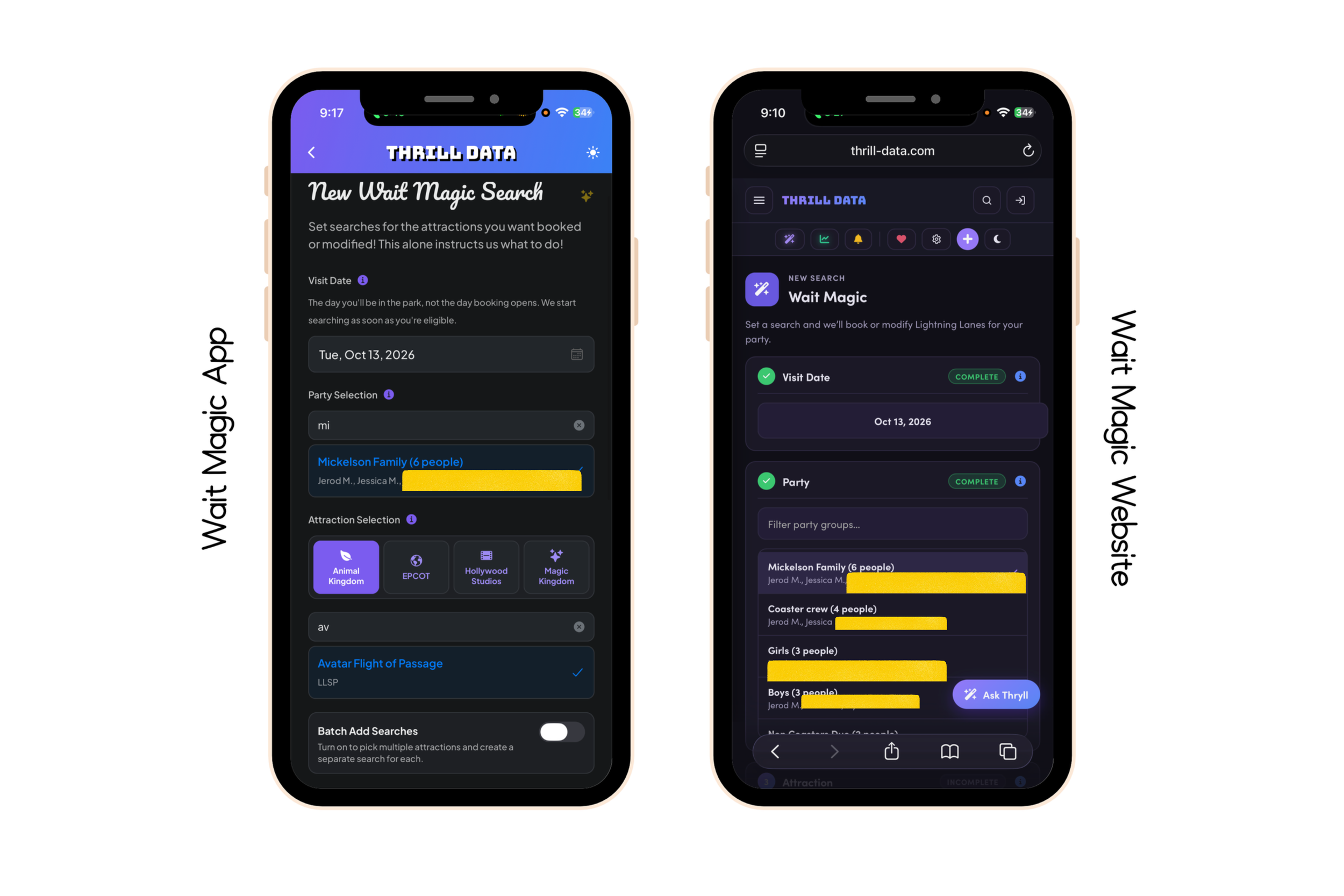
The app felt much more intuitive because each step had its own place.
If the app is still in beta when you're reading this, follow Thrill Data's current instructions for access. If you're reading this later and the full app has launched, great. Use the current version available to you.
Either way, my preferred workflow is still the same:
I want to do the complicated setup on my computer at home and use my phone for the actual park day.
Wait Magic vs. Standby Skipper
I've used both Wait Magic and Standby Skipper, and I don't think they're exactly the same experience even though they are solving a similar problem.
For me, Standby Skipper has traditionally felt more beginner-friendly. Wait Magic gives me more control.
That additional control is exactly why I like Wait Magic, but it's also why I think Wait Magic can feel overwhelming for someone who doesn't understand Lightning Lane.
During testing, I even ran both services at the same time. Sometimes Standby Skipper grabbed one of the harder attractions first. Sometimes Wait Magic did. There wasn't a magical service that won every single time because ultimately both are dealing with Disney's availability.
I don't think the average family needs to pay for two services.
What testing both helped me understand is the type of person I think Wait Magic is best for.
If you want something very simple, another service may feel easier.
If you want control over parties, attractions, return windows, modifications and a more detailed strategy, Wait Magic gives you a lot to work with.
The Biggest Wait Magic Mistakes I Would Avoid
After using Wait Magic, most of the mistakes I would avoid have less to do with the technology and more to do with the instructions you're giving it.
The first is creating too many searches. More searches do not automatically equal a better day. Focus on the things that actually matter.
The second is making every search “anytime.” That's how you end up walking back and forth across EPCOT all day.
The third is doing the opposite and making your windows so narrow that Wait Magic barely has an opportunity to help you.
The fourth is forgetting to clean up searches after you've ridden something through standby or changed your plans.
And the fifth is expecting Wait Magic to create availability.
It can't.
Think of Wait Magic like an assistant. A really good assistant can save you an enormous amount of time, but you still need to give that person useful instructions.
My Wait Magic Planning Formula
If all of this feels like a lot, this is the simplest way I can explain how I would build my day.
First, decide what kind of Disney day you're having and identify your family's true priorities. Then make your initial Lightning Lane selections through Disney using the strategy you've already created.
Once those reservations exist, use Wait Magic to improve the times that don't work well and create a handful of searches for the additional attractions you most want.
Give those searches time windows that correspond with where you realistically expect to be in the park.
Then go to Disney.
As you redeem Lightning Lanes and additional booking opportunities become available, let Wait Magic work through the priorities you've already established. Periodically check your searches, remove things you don't need and adjust your plan if your actual Disney day starts looking different from the one you created at home.
That's it.
You are still in charge of the plan.
Wait Magic is doing some of the clicking.
Is Wait Magic Worth It?
For me, yes. Absolutely.
I give Wait Magic a 10 out of 10 for what I need it to do, but that recommendation comes with a giant asterisk: learn Lightning Lane first.
Wait Magic isn't going to take someone who doesn't understand Disney's Lightning Lane system and magically create the perfect park day. You still need to understand your priorities, know which attractions are difficult to get, think about park geography and have a general idea of how your family wants to tour.
But if you're willing to do that work ahead of time, I think Wait Magic can be incredibly valuable.
I'm traveling with four kids. I'm already managing where everyone needs to be, what we're eating, who's hungry, who needs a bathroom, who's suddenly decided they hate roller coasters today and everything else that comes with a family Disney trip.
On multigenerational trips, that becomes even more complicated.
If I can sit down before the vacation, create our parties, decide our priorities, establish realistic return-time windows and tell Wait Magic what I'm looking for, I have handed off one of the jobs I would normally be carrying myself.
That's what I'm paying for.
I'm not paying for secret Lightning Lanes.
I'm not paying for guaranteed rides.
I'm paying to get some of my Disney day back.
My Wait Magic Setup Checklist
If you're getting ready for your trip and want the condensed version of this entire guide, this is the order I would follow:
Learn Disney's current Lightning Lane system before buying Wait Magic.
Decide what type of park day you're planning and identify your family's highest priorities.
Create your Thrill Data account and purchase the membership length that makes sense for your trip.
Connect Wait Magic through Thrill Data's current MDX Connector instructions.
Confirm that every person who needs Lightning Lane plans is properly linked.
Create your common family parties and subgroups before the vacation.
Make your initial Lightning Lane selections through Disney when your booking window opens.
Look at the return times you received and decide which ones actually need improvement.
Create Wait Magic modification searches for the reservations you want to move.
Create a small number of additional searches for attractions that are genuine priorities.
Give those searches realistic windows based on where you expect to be in the park.
Decide whether each successful search should pause or continue looking for something better.
Once you're in the park, periodically clean up searches that are no longer relevant.
Keep checking your actual Disney plans so you know where you're going next.
Remember that Disney availability still controls everything.
Most of that work happens before you arrive, and that is exactly why I like this system.
When I'm standing inside EPCOT, I don't want to be building my strategy.
I want to be enjoying EPCOT.
The Bottom Line on Wait Magic
Wait Magic isn't magic because it can somehow create a sold-out Lightning Lane.
The magic, at least for me, is that I don't have to keep looking for it myself.
I can do the work before the vacation. I can learn Lightning Lane, understand sellout order, identify our priorities, think about geography and build a realistic park plan. Then I can tell Wait Magic what I'm looking for and let it take over some of the repetitive searching I would otherwise be doing manually.
Will it get every Lightning Lane you request? No.
Could you occasionally beat it by manually refreshing? Absolutely.
Could it also be searching while you're riding another attraction, eating lunch, walking around World Showcase, taking pictures, taking your child to the bathroom for the fifteenth time or simply enjoying your family?
Yes.
And THAT is why I think it's worth it.
Learn Lightning Lane. Have a strategy. Know your priorities. Then let Wait Magic help you execute the plan.
For me, that's a 10 out of 10.